Git branch-rebase
There are two main ways to integrate changes from different branches in Git: merge and rebase.In this section we'll learn what rebasing is, how to use it, show you how amazing it is, and point out when you should avoid using it.
Basic operations of rebasing
Please review the previous example in Branch Merging. You will see that the development task was forked to two different branches and each submitted updates.
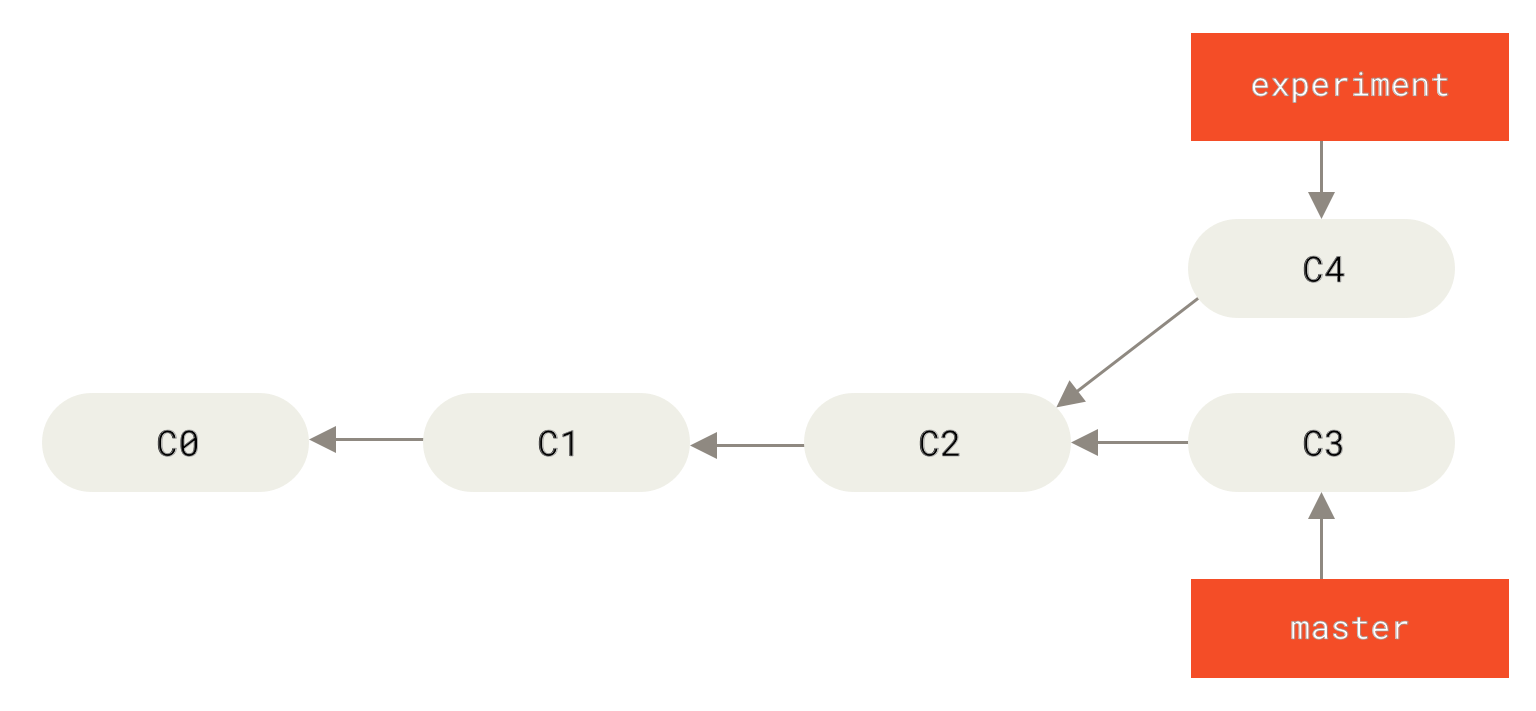
Figure 0. Fork commit history ▲
As introduced before, the easiest way to merge branches is the merge command.It will perform a three-way merge of the latest snapshots of the two branches (C3 and C4) and their most recent common ancestor (C2). The result of the merge is to generate a new snapshot (and commit).
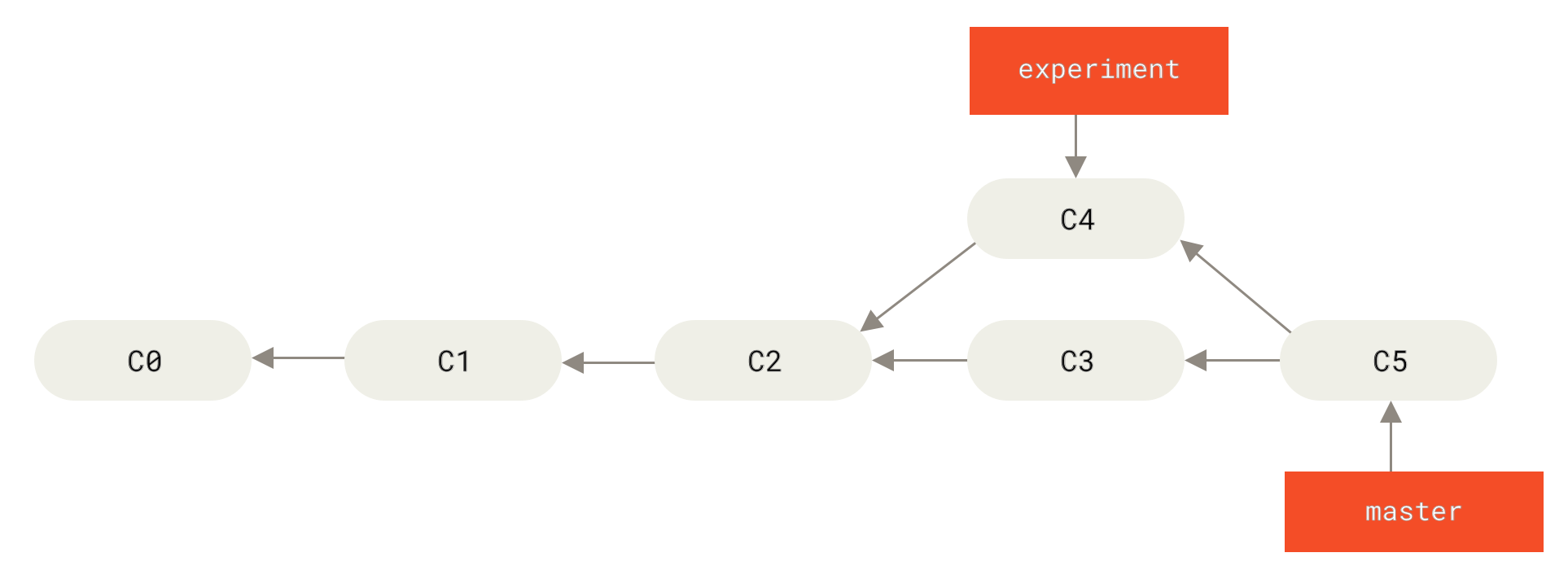
Figure 1. Integrating the history of forks through merge operations ▲
concept
Rebasing is: copying all modifications on one branch to another branch
Except merge , there is another way: you can extract the C4 patches and modifications introduced in C3 applied once.In Git, this operation is called rebase .you can use rebase The command moves all changes committed on one branch to another branch, as if "replayed".
In this example, you can check out the experiment branch and then rebase it on the master branch:
$ git checkout experiment
$ git rebase master # 将experiment上的修改变基到master分支上(将experiment的提交移动到master上。)
First, rewinding head to replay your work on top of it...
Applying: added staged command
Its principle is to first find the most recent common ancestor C2 of the two branches (i.e. the current branch experiment and the target base branch master of the rebase operation), then compare the previous commits of the current branch with respect to the ancestor, extract the corresponding modifications and save them as temporary files, then point the current branch to the target base C3, and finally apply the modifications previously saved as temporary files in sequence.(Translation note: The commit id is stated for ease of understanding, the same below)
Principle
Find the nearest common ancestor of the current branch and the target branch
Compare previous commits of the current branch with respect to the common ancestor
Extract the corresponding modifications and save them as temporary files
Point the current branch to the target branch
Apply the modifications to the previous temporary files in sequence
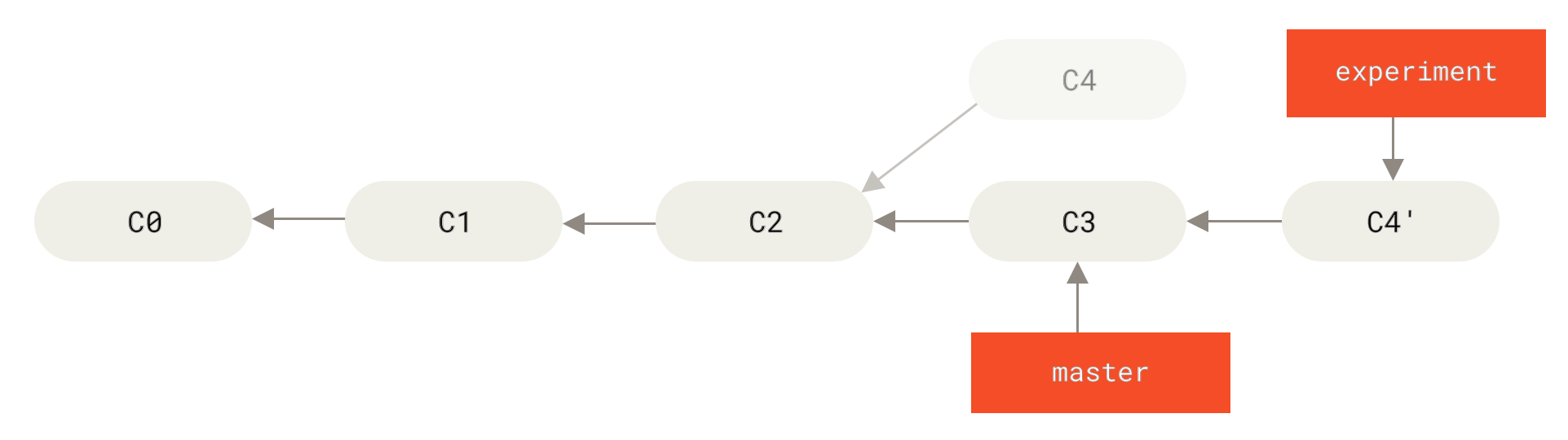
Figure 2. Rebase the changes in C4 to C3 ▲
Now go back to the master branch and do a fast-forward merge.
$ git checkout master
$ git merge experiment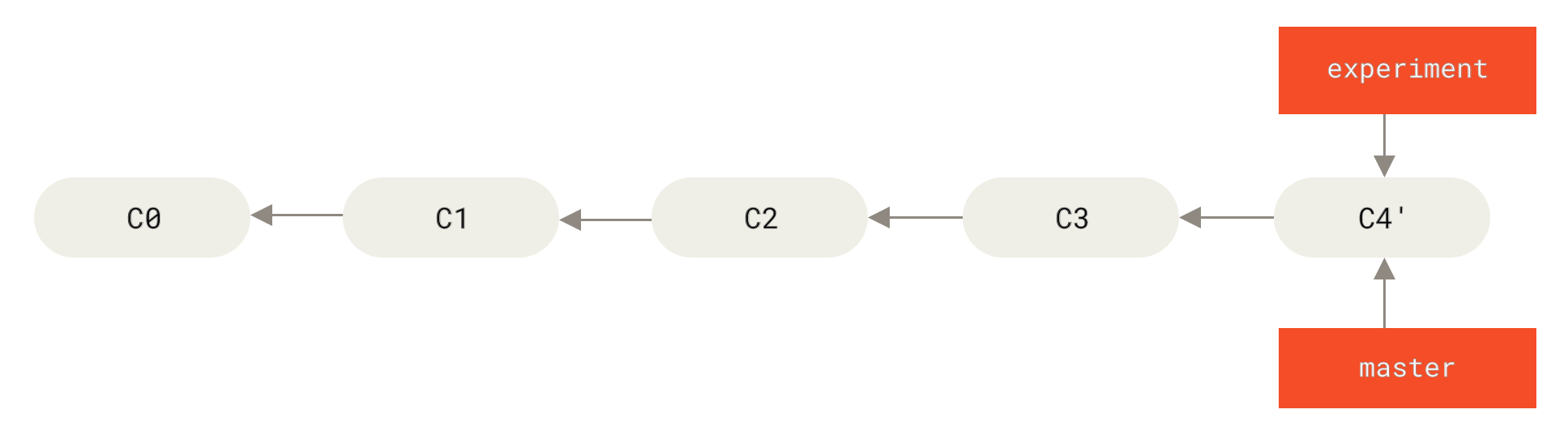
Figure 3. Fast forward merge of master branch ▲
steps
First check out the source branch and base the changes in the source branch to the target branch.Switch back to the target branch and perform a fast-forward merge
# 示意:
git checkout <源分支>
git (源分支的修改)rebase(到) <目标分支>
git checkout <目标分支>
git merge <源分支>
At this time, C4' The snapshot pointed to is the same as the merge example in C5 The snapshots pointed to are exactly the same.There is no difference in the end result of these two integration methods, but Rebasing makes commit history tidier .When you look at the history of a rebased branch, you will find that although the actual development work is parallel, they appear to be serial, and the commit history is a straight line with no forks.
Generally we do this to ensure that the commit history is kept clean when pushing to the remote branch - For example, when contributing code to a project maintained by someone else.In this case, you first develop in your own branch, and when development is complete you need to rebase your code to origin/master and then submit the changes to the main project .In this case, the maintainers of the project no longer need to do the integration work and can only fast-forward the merge.
Please note that whether it is through rebasing or three-way merging, the snapshot pointed to by the final result of the integration is always the same, but the commit history is different.Rebase is to apply a series of commits to another branch in the original order, while merging is to combine the final results.
Advantages
Advantages of rebasing: Make the commit record cleaner.
More interesting rebasing examples
When rebasing two branches, the generated "replay" does not have to be applied on the target branch. You can also specify another branch for application.Just like the example in Separating the commit history of a topic branch from a topic branch.You create a topic branch server, add some features to the server, and commit C3 and C4.Then I created the topic branch client from C3, added some features to the client, and submitted C8 and C9.Finally, you go back to the server branch and commit C10.
More interesting rebasing examples
When rebasing two branches, the generated "replay" does not have to be applied on the target branch. You can also specify another branch for application.Just like the example in Separating the commit history of a topic branch from a topic branch.You create a topic branch server, add some features to the server, and commit C3 and C4.Then I created the topic branch client from C3, added some features to the client, and submitted C8 and C9.Finally, you go back to the server branch and commit C10.
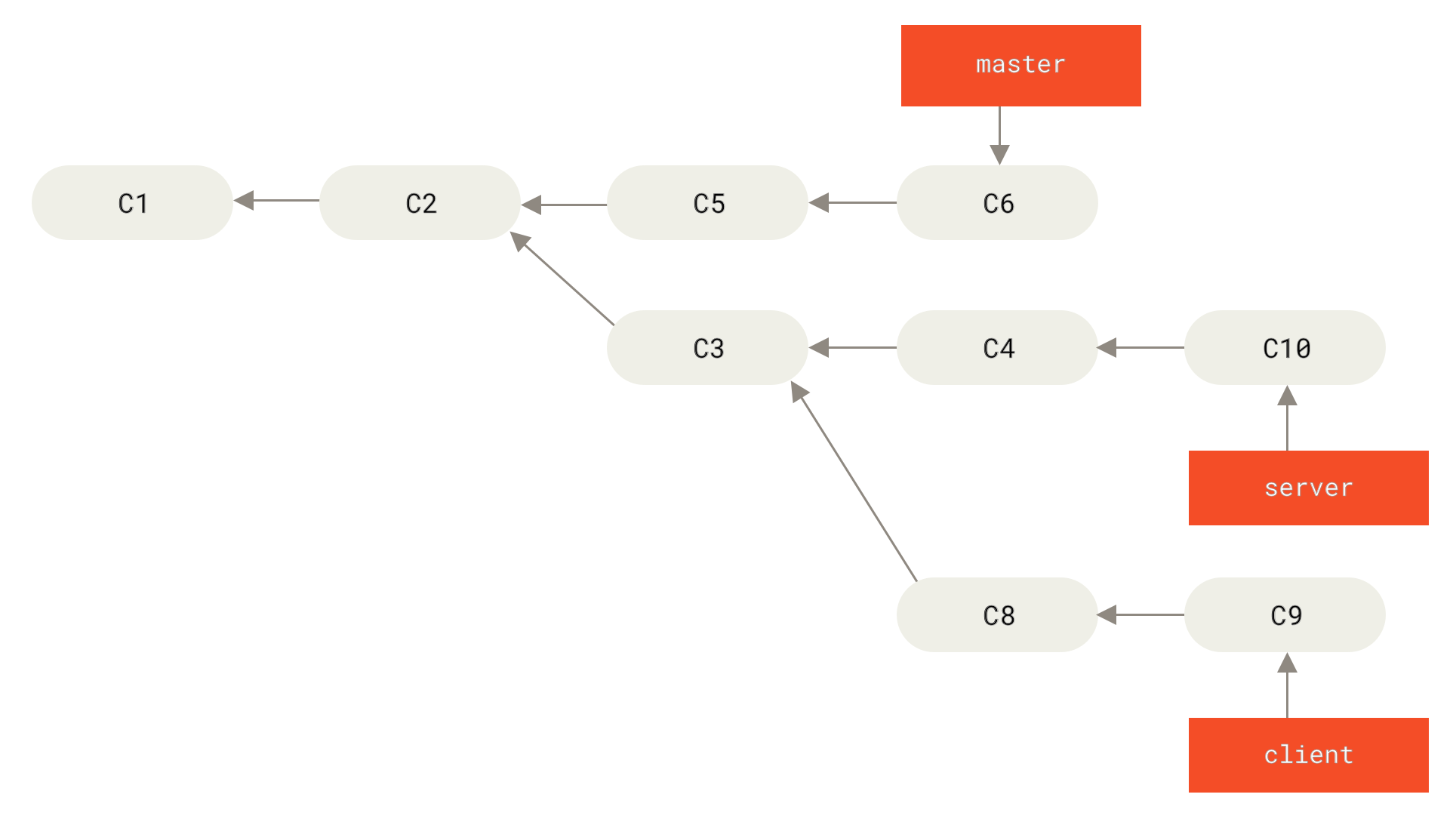
Figure 4. Submission history of a topic branch branched from a topic branch ▲
Suppose you want to merge the changes in client into the master branch and publish it, but you don't want to merge the changes in server yet because they need to be more comprehensively tested.At this time, you can use the --onto option of the git rebase command to select the changes in the client branch but not in the server branch (i.e. C8 and C9) and replay them on the master branch:
$ git rebase --onto master server clientThe above command means: "Take out the client branch, find the patches after it branched from the server branch, and then replay these patches on the master branch to make client look like it was directly modified based on master".This is a little complicated to understand, but the effect is very cool.
--onto option
Select the modifications in branch C but not in branch B and apply them to branch A.
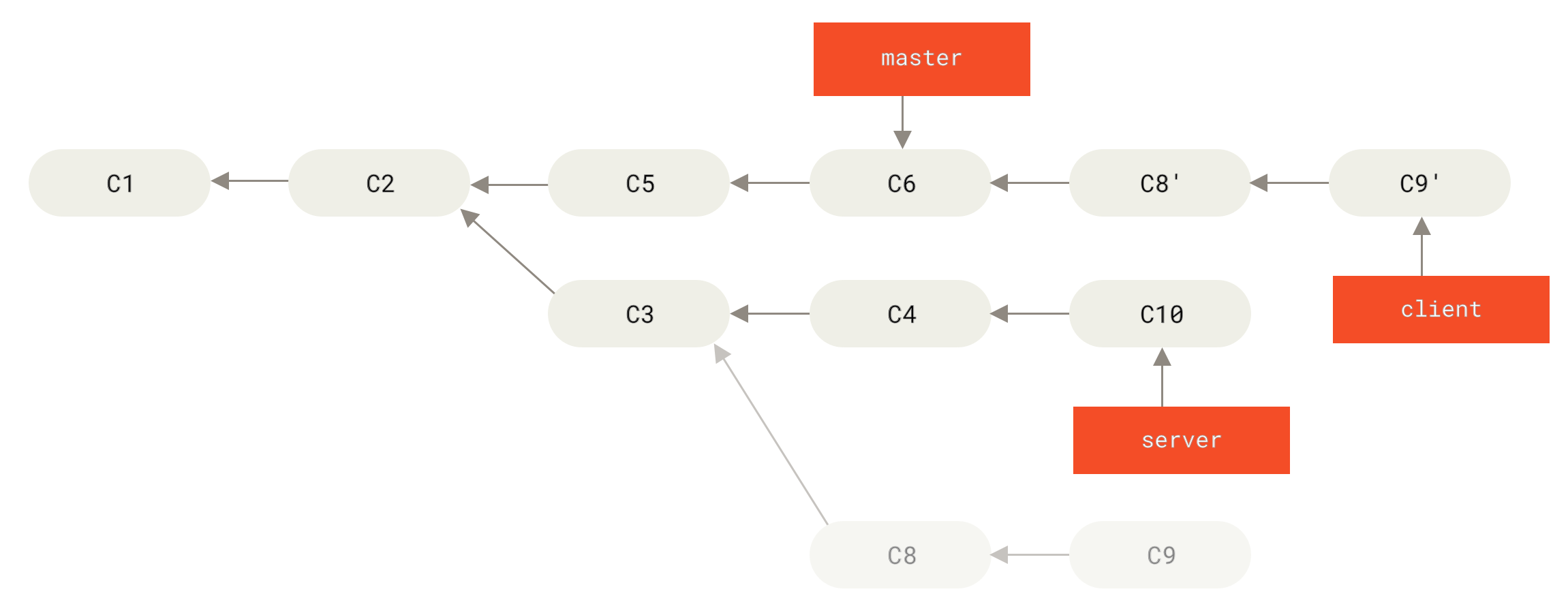
Figure 5. Intercept another topic branch on the topic branch, and then rebase to other branches ▲
It is now possible to fast-forward merge the master branch.(As shown in the figure Fast forward merge master branch to include modifications from client branch):
$ git checkout master
$ git merge client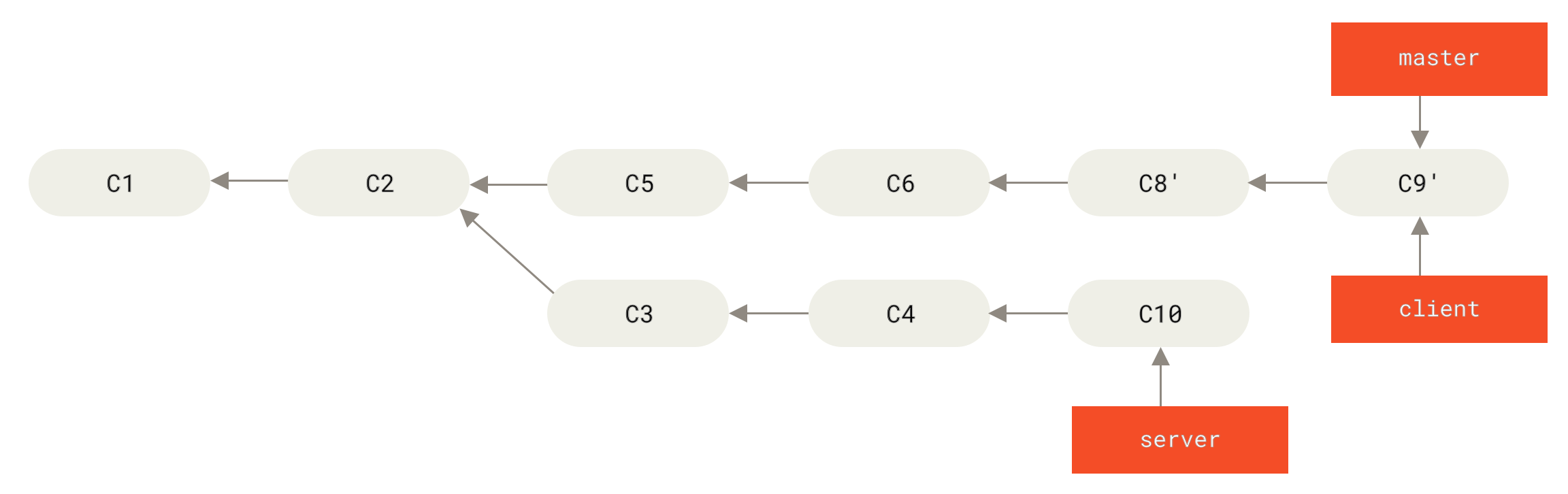
Figure 6. Fast forward merge of `master` branch to include changes from `client` branch ▲
Eliminate the step of switching to the source branch first
git rebase <目标(当前)分支> <源分支> # 将源分支变基到目标分支。执行此命令后会自动切换到源分支
git checkout <目标分支>
git merge <源分支>
Note: Use this method to ensure that the code on the source branch is up to date.
Next you decide to integrate the changes in the server branch.Use the git rebase <basebranch> <topicbranch> command to directly rebase the topic branch (ie server in this example) to the target branch (ie master).Doing this will save you the multiple steps of first switching to the server branch and then executing the rebase command on it.
$ git rebase master serverAs shown in the figure Rebase changes in server to master, the code in server is "continued" to the end of master.

Figure 7. Rebase the changes in `server` to `master` ▲
Then you can fast-forward and merge the main branch master:
$ git checkout master
$ git merge server
At this point, the changes in the client and server branches have been integrated into the main branch. You can delete these two branches, and the final submission history will become as shown in the figure Final submission history:
$ git branch -d client
$ git branch -d server
Figure 8. Final submission history ▲
Risks of rebasing
golden rule
Well, the wonderful rebasing is not perfect. There is one rule to follow when using it:
Do not perform a rebase if the commits exist outside of your repository and someone else may be developing based on them.
If you follow this golden rule, nothing can go wrong.Otherwise, the people will hate you, and your friends and family will laugh at you and spurn you.
TIP
For example: when several people are developing and submitting on a topic branch at the same time, you should not perform the rebase midway. The rebase can only be performed after everyone has completed their work.
The essence of rebasing
The essence of the rebase operation is to discard some existing commits and then create new commits that have the same content but are actually different. If you have pushed the submission to a certain warehouse, and others have also pulled the submission from the warehouse and carried out subsequent work, at this time, if you use git rebase The command rearranges the commits and pushes again, so your peers will have to integrate their work at hand with your commits again, and if you then pull and integrate their modified commits, things will get messy.
Let's look at a problem caused by performing a rebasing operation on a public repository.Suppose you clone from a central server and then do some development on top of it.Your submission history looks like this:
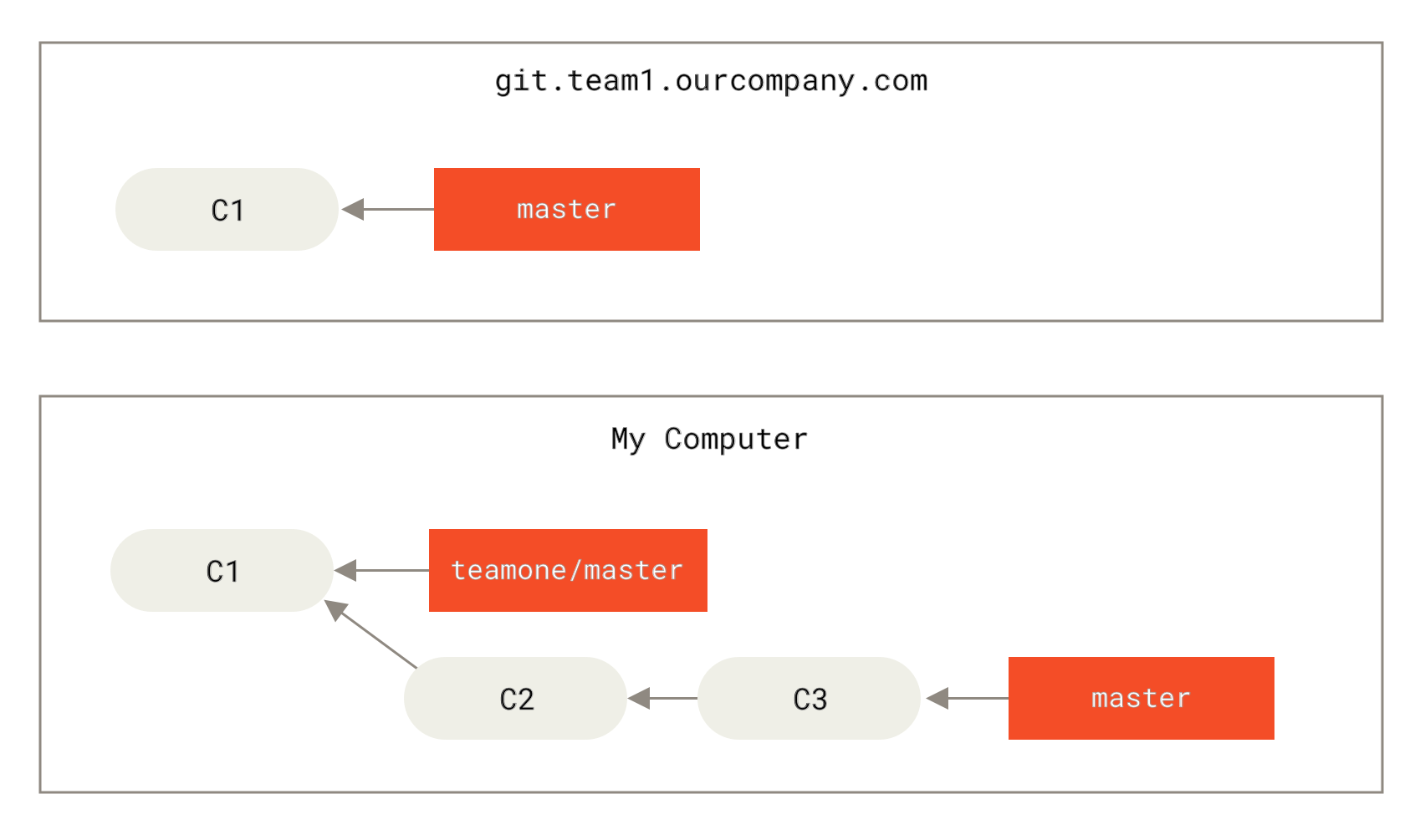
Figure 9. Clone a repository and then perform some development on it ▲
Then someone commits some more changes to the central server, including a merge.You grab these changes on the remote branch and merge them into your local development branch, and your commit history looks like this:
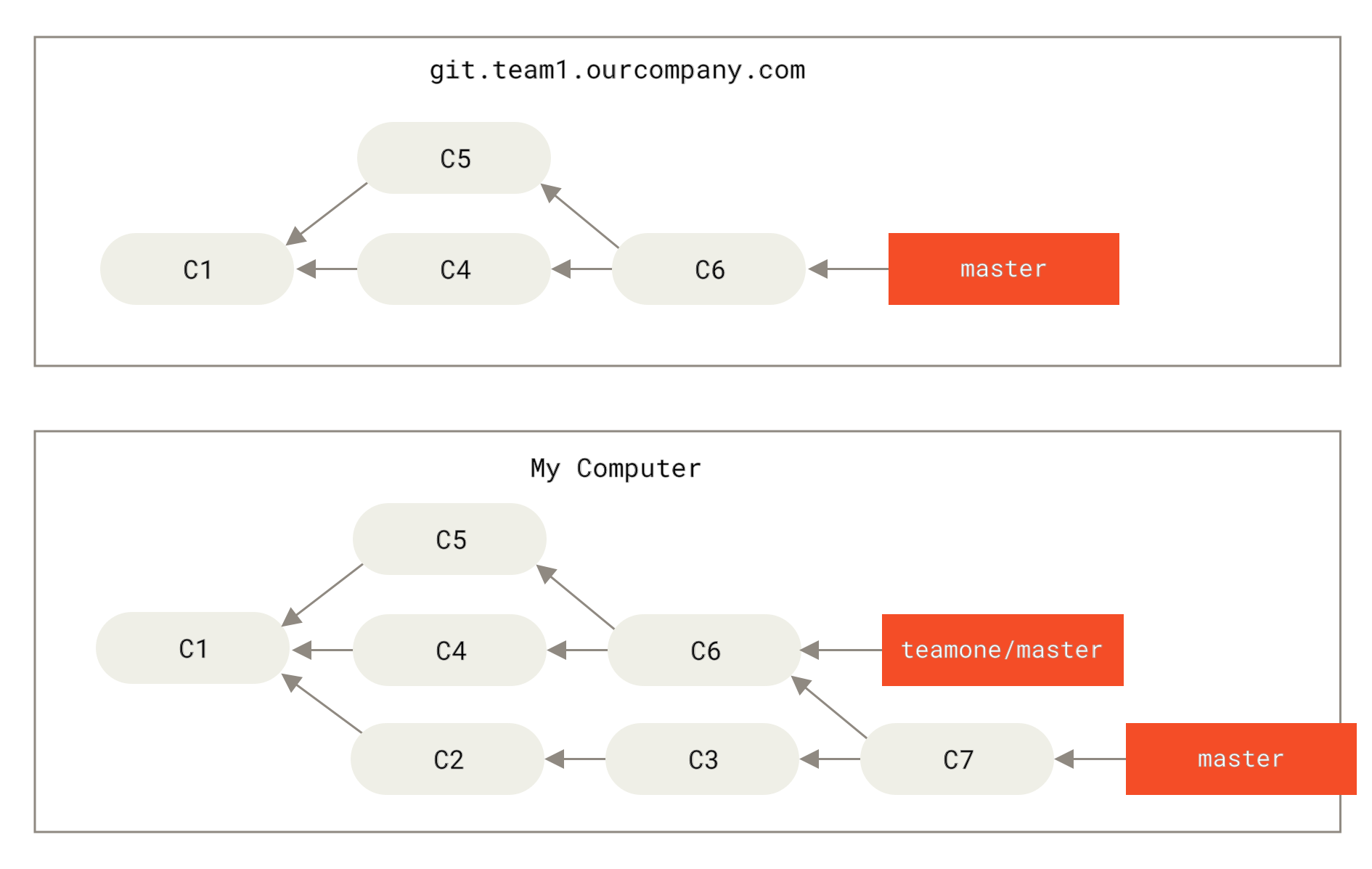
Figure 10. Grab other people’s submissions and merge them into your own development branch ▲
Next, this person decided to roll back the merge operation and use rebase; then he used the git push --force command to overwrite the commit history on the server.Later, when you fetch updates from the server, you will find some new submissions.
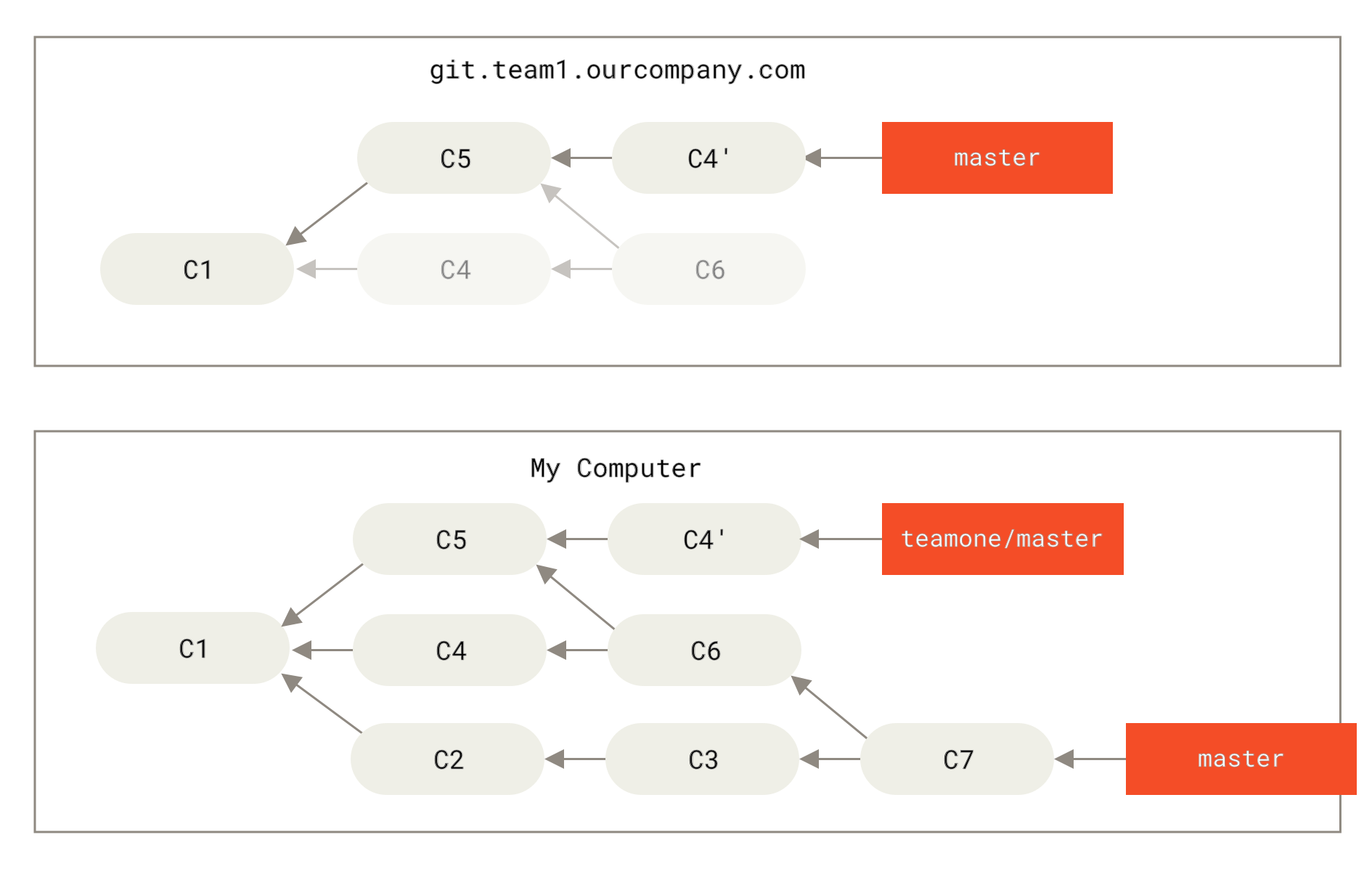
Figure 11. Someone pushed a rebased commit and discarded some of the commits your local development was based on ▲
The result is an awkward situation for both of you.If you execute the git pull command, you will merge the content from the two commit histories to generate a new merge commit, and the final repository will look like this:
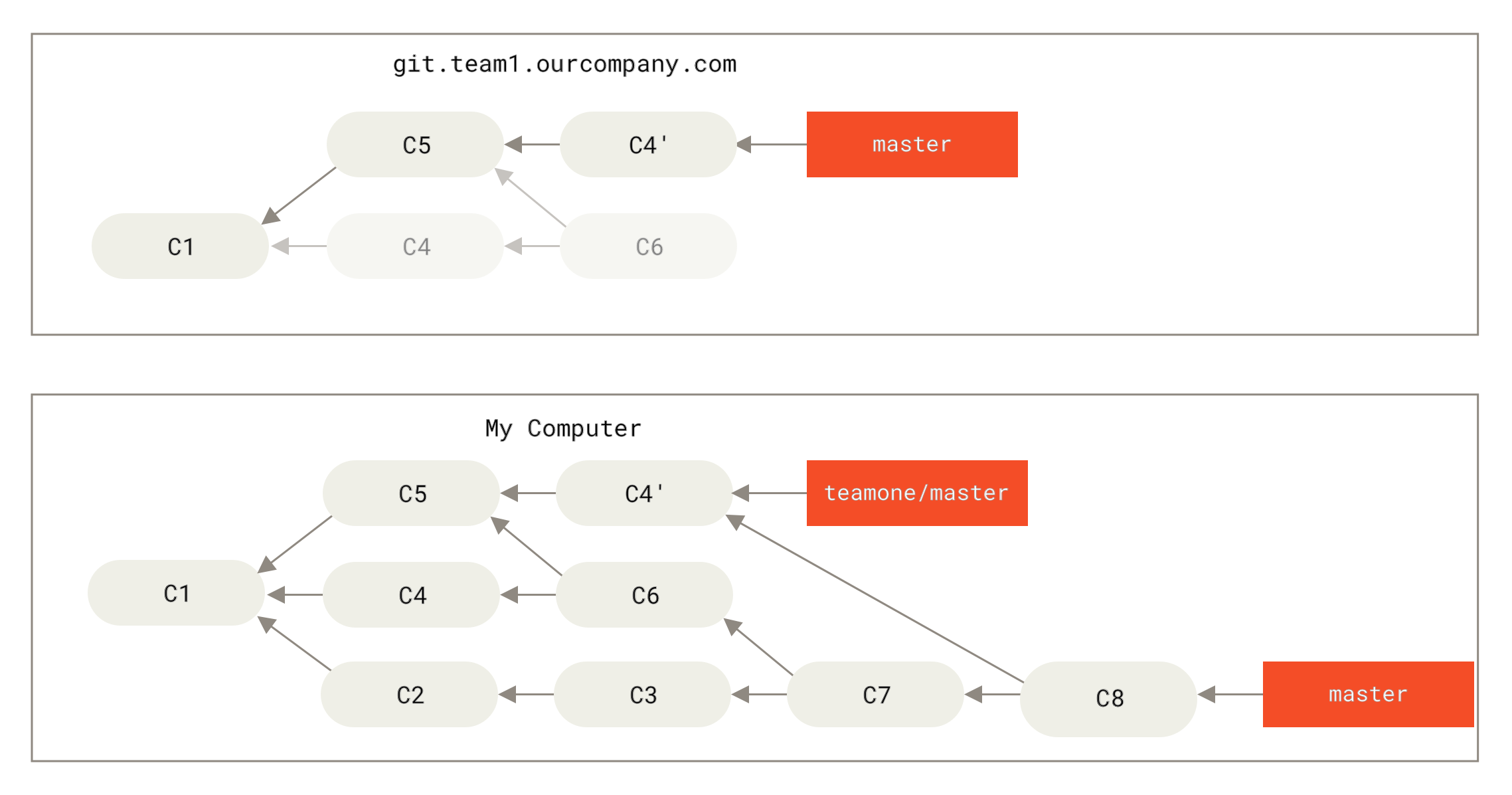
Figure 12. You merged the same content again and generated a new submission ▲
If you execute the git log command at this time, you will find that the author, date, and log of the two submissions are actually the same, which is confusing.Additionally, if you push this bunch back to the server, you're actually bringing back commits that have been discarded by the rebase, which makes things even more confusing.Obviously the other party does not want to see C4 and C6 in the commit history, because he had previously discarded these two commits through rebase.
Use rebase to solve rebase
If you really encounter a similar situation, Git has some advanced magic to help you.If someone on the team forces a push and overwrites some of the commits you're based on, all you need to do is check what changes you made and which changes they overwrote.
In fact, in addition to calculating the SHA-1 checksum for the entire commit, Git also calculates a checksum for the modifications introduced by this commit - the "patch-id".
If you pull an overwritten update and rebase your work on it, Git will generally be able to successfully identify your changes and apply them to the new branch.
For example, if you encounter the aforementioned Someone pushed a rebased commit and dropped some of the commits your local development was based on In that situation, if instead of executing the merge, we execute git rebase teamone/master , Git will:
- Check which commits are unique on our branch (C2, C3, C4, C6, C7)
- Check which of these commits are not the result of a merge operation (C2, C3, C4)
- Check which commits were not included in the target branch when the other party overwrote the update (only C2 and C3, because C4 is actually C4')
- Apply these found commits to
teamone/master
As a result, we will get different results from You merged the same content again and generated a new commit, as shown in the figure Perform rebase again on a branch that was rebased and then force pushed.
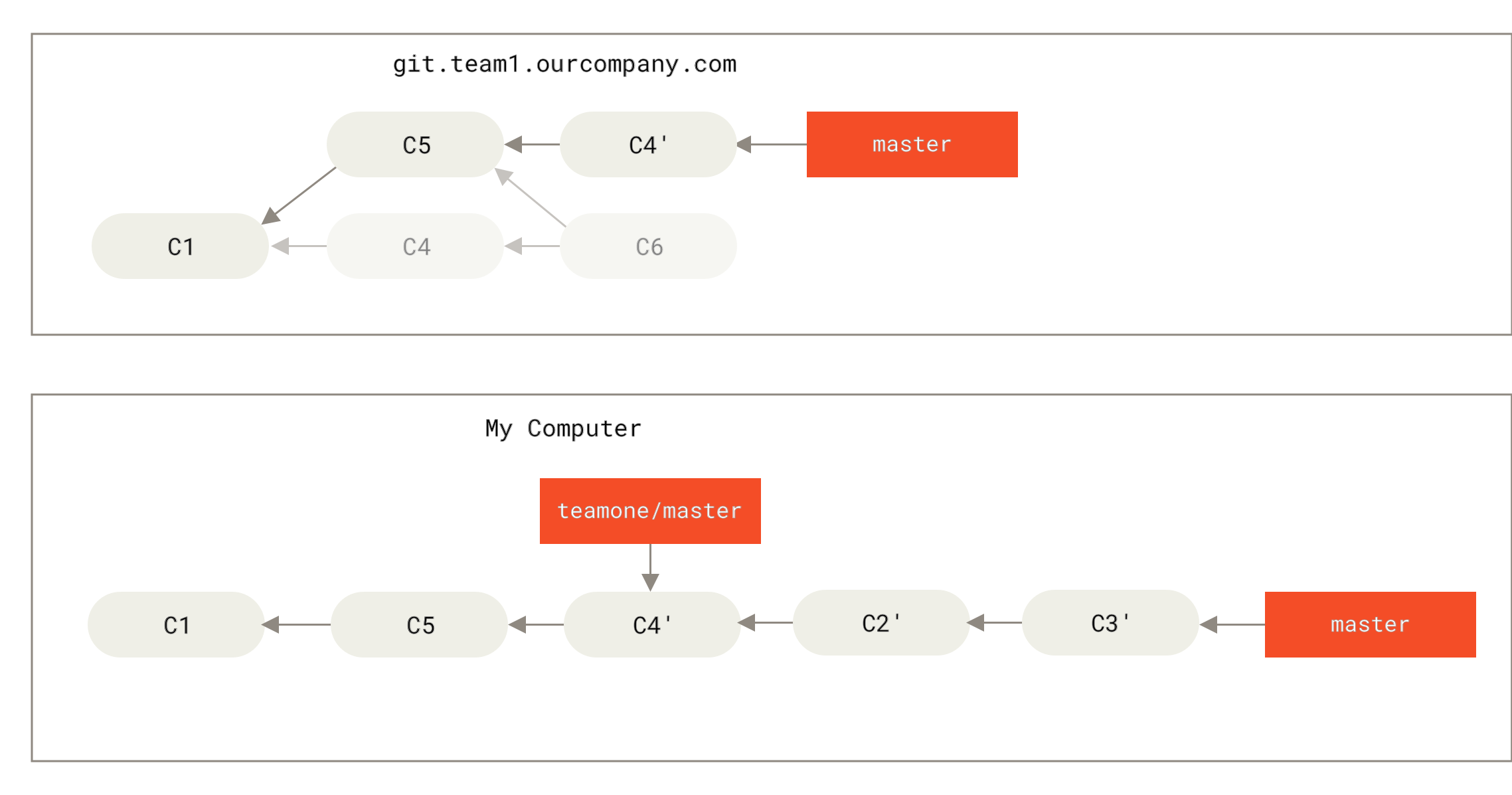
Figure 13. Perform rebase again on a branch that was rebased and then force pushed ▲
For the above solution to be effective, the other party needs to ensure that when rebasing C4' and C4 are almost the same.Otherwise the rebase operation will not be recognized and another one similar to C4 patch (and this patch probably won't be neatly integrated into history because the changes in the patch already exist somewhere).
Another easy way in this case is to use the git pull --rebase command instead of git pull directly.Or you can complete this process manually, first git fetch, and then git rebase teamone/master.
If you are accustomed to using git pull and want to use the option --rebase by default, you can execute this statement git config --global pull.rebase true to change the default configuration of pull.rebase.
If you only rebase commits that don't leave your computer, you'll be fine.If you rebase a commit you've already pushed but no one else has a commit based on it, that's fine.If you rebase commits that have been pushed to a shared repository and thus lose some of the commits that others are basing their development on, you'll be in big trouble and your colleagues will look down upon you for it.
If you or your colleagues decide to do this in some situation, please be sure to notify everyone to execute git pull --rebase command, which will not avoid the pain, but it will alleviate it.
Rebase vs. merge
At this point, you have learned how to use rebase and merge in actual combat. You will definitely want to ask which method is better.Before answering this question, let's take a step back and want to discuss what commit history actually means.
There is a view that the submission history of the warehouse is Record what actually happened .It is a historical document that is valuable in itself and cannot be altered randomly.From this perspective, changing the commit history is a sacrilege, you use lies Covering up what actually happened.What if the commit history resulting from a merge is a mess?Since this is the case, these traces should be preserved for future generations to review.
Another view is just the opposite, and they believe that commit history is what happened during the course of the project.No one publishes the first draft of a book, and software maintenance manuals require repeated revisions before they are easy to use.People who hold this view will use tools such as rebase and filter-branch to write stories, and write whatever is convenient for subsequent readers.
Now, let's go back to the previous question, is it better to merge or rebase?Hopefully you understand that there is no easy answer.Git is a very powerful tool that allows you to do a lot with your commit history, but every team and every project has different needs for it.Now that you have learned how to use the two separately, I believe you can make a wise choice based on the actual situation.
The general principle is to only perform rebase operations to clean up the history of local modifications that have not been pushed or shared to others, and never perform rebase operations on commits that have been pushed elsewhere. In this way, you can enjoy the convenience of both methods.