The template compiler and double-ended diff examples primarily target Vue 2; Vue 3 uses different compiler optimizations and keyed diff.
Common principles of vue
- Compilation principle
- Responsive principle, dependency collection
- Component development (throughout the vue process)
- diff algorithm
Overview of the template compilation process
- Compile templates into abstract syntax trees You can see what an abstract syntax tree looks like here Just select the vue option The parsing template obtains tags, attributes, expressions, etc. through regular expressions. When it encounters a start tag, it is put into the stack. When it encounters an end tag, it is popped out of the stack and spliced into an AST abstract syntax tree. The optimizer then traverses the AST to mark static nodes. It is mainly used for virtual DOM rendering optimization.
- Generate code based on the abstract syntax tree to generate a render function. The vue template compiler compiles the template into a render function and executes the render function to generate a vnode.Perform patch and diff based on vnode.
Use vue-loader to compile the template in the development environment.
width function
const obj = { a: 100, b: 200}

console.log(obj.a)
console.log(obj.b)
console.log(obj.c) // undefined

with(obj){
    console.log(a);
    console.log(b);
    console.log(c); // 会报错
}

// with语法改变自由变量的查找规则,当做obj属性来查找,如果调用了查找不到的属性会报错
// with打破了作用域的规则,易读性变差
Introduce vue-template-compiler to compile string templates, write the template and output in index.js, and execute node index.js in the terminal to view the output.
// 插值
const template = `<p>{{message}}</p>`
// 编译后的结果是
// with(this){return _c('p',[_v(_s(message))])}
// 替换成函数
// with(this){return createElement('p',[createTextVNode(toString(message))])}

// // 表达式
// const template = `<p>{{flag ? message : 'no message found'}}</p>`
// 编译后的结果是
// // with(this){return _c('p',[_v(_s(flag ? message : 'no message found'))])}

// // 属性和动态属性
// const template = `
//     <div id="div1" class="container">
//         <img :src="imgUrl"/>
//     </div>
// `
// 编译后的结果是
// with(this){return _c('div',
//      {staticClass:"container",attrs:{"id":"div1"}},
//      [
//          _c('img',{attrs:{"src":imgUrl}})])}

// // 条件
// const template = `
//     <div>
//         <p v-if="flag === 'a'">A</p>
//         <p v-else>B</p>
//     </div>
// `
// with(this){return _c('div',[(flag === 'a')?_c('p',[_v("A")]):_c('p',[_v("B")])])}

// 循环
// const template = `
//     <ul>
//         <li v-for="item in list" :key="item.id">{{item.title}}</li>
//     </ul>
// `
// with(this){return _c('ul',_l((list),function(item){return _c('li',{key:item.id},[_v(_s(item.title))])}),0)}

// 事件
// const template = `
//     <button @click="clickHandler">submit</button>
// `
// with(this){return _c('button',{on:{"click":clickHandler}},[_v("submit")])}

// v-model
// const template = `<input type="text" v-model="name">`
// 主要看 input 事件
// with(this){
//    return _c('input',
//    {
//      directives: [{name:"model",rawName:"v-model",value:(name),expression:"name"}],
//      attrs:{"type":"text"},domProps:{"value":(name)},
//      on:{"input":function($event){if($event.target.composing)return;name=$event.target.value}}})
// }

// 在模板渲染阶段v-model已经被挂载上了onInput的事件来更新数据,每次更新触发渲染


// 编译
const res = compiler.compile(template)
console.log(res.render)


// // 从 vue 源码中找到缩写函数的含义
// function installRenderHelpers (target) {
//     target._o = markOnce;
//     target._n = toNumber;
//     target._s = toString;
//     target._l = renderList;
//     target._t = renderSlot;
//     target._q = looseEqual;
//     target._i = looseIndexOf;
//     target._m = renderStatic;
//     target._f = resolveFilter;
//     target._k = checkKeyCodes;
//     target._b = bindObjectProps;
//     target._v = createTextVNode;
//     target._e = createEmptyVNode;
//     target._u = resolveScopedSlots;
//     target._g = bindObjectListeners;
//     target._d = bindDynamicKeys;
//     target._p = prependModifier;
// }
// this._c = (a, b, c, d) => createElement(contextVm, a, b, c, d, needNormalization)
Responsive
Implementation principle:
Monitor data changes through Object.defineProperty, and trigger set to update the view when the data changes.When encountering an object object, continue deep traversal to implement deep monitoring of the object. When encountering an array, redefine the array object, extend new methods, and implement data monitoring.
Disadvantages of Object.defineProperty:
- Deep monitoring requires recursion to the end at one time, which requires a large amount of calculation.If the data is too large, it will get stuck.
- Unable to monitor new attributes/deleted attributes (can be solved through vue.set, vue.delete)
- Arrays cannot be monitored natively and require special processing.
// 触发更新视图
function updateView() {
    console.log('视图更新')
}

// 重新定义数组原型
const oldArrayProperty = Array.prototype
// 创建新对象,原型指向 oldArrayProperty ,再扩展新的方法不会影响原型
const arrProto = Object.create(oldArrayProperty);
['push', 'pop', 'shift', 'unshift', 'splice'].forEach(methodName => {
    arrProto[methodName] = function () {
        updateView() // 触发视图更新
        oldArrayProperty[methodName].call(this, ...arguments)
        // Array.prototype.push.call(this, ...arguments)
    }
})

// 重新定义属性,监听起来
function defineReactive(target, key, value) {
    // 深度监听
    observer(value)

    // 核心 API
    Object.defineProperty(target, key, {
        get() {
            return value
        },
        set(newValue) {
            if (newValue !== value) {
                // 深度监听
                observer(newValue)

                // 设置新值
                // 注意,value 一直在闭包中,此处设置完之后,再 get 时也是会获取最新的值
                value = newValue

                // 触发更新视图
                updateView()
            }
        }
    })
}

// 监听对象属性
function observer(target) {
    if (typeof target !== 'object' || target === null) {
        // 不是对象或数组
        return target
    }

    // 污染全局的 Array 原型
    // Array.prototype.push = function () {
    //     updateView()
    //     ...
    // }

    if (Array.isArray(target)) {
        target.__proto__ = arrProto
    }

    // 重新定义各个属性(for in 也可以遍历数组)
    for (let key in target) {
        defineReactive(target, key, target[key])
    }
}

// 准备数据
const data = {
    name: 'zhangsan',
    age: 20,
    info: {
        address: '北京' // 需要深度监听
    },
    nums: [10, 20, 30]
}

// 监听数据
observer(data)

// 测试
// data.name = 'lisi'
// data.age = 21
// // console.log('age', data.age)
// data.x = '100' // 新增属性,监听不到 —— 所以有 Vue.set
// delete data.name // 删除属性,监听不到 —— 所有已 Vue.delete
// data.info.address = '上海' // 深度监听
data.nums.push(4) // 监听数组
vue2.x
- Core API - object.defineProperty
- When the listening object needs to deeply traverse and monitor the array, special processing needs to be done on the array attributes. Process the array data and redefine the array prototype to trigger the view update.
- Deep monitoring of complex objects will be problematic because it requires recursion to the end when processing monitoring, which requires a large amount of calculation at one time.
- Unable to monitor new and deleted properties (vue.set, vue.delete)
vue3
- Core API proxy, reflect
- Deep monitoring performance is better
- Can monitor to add and delete attributes
- Can monitor array changes
- Proxy can circumvent the problem of object.defineProperty, but proxy is not compatible with all browsers
// proxy创建响应式
function reactive(target = {}) {
    if (typeof target !== 'object' || target == null) {
        // 不是对象或数组,则返回
        return target
    }

    // 代理配置
    const proxyConf = {
        get(target, key, receiver) {
            // 只处理本身(非原型的)属性
            const ownKeys = Reflect.ownKeys(target)
            if (ownKeys.includes(key)) {
                console.log('get', key) // 监听
            }

            const result = Reflect.get(target, key, receiver)

            // 深度监听
            // 性能如何提升的?
            return reactive(result)
        },
        set(target, key, val, receiver) {
            // 重复的数据,不处理
            if (val === target[key]) {
                return true
            }

            const ownKeys = Reflect.ownKeys(target)
            if (ownKeys.includes(key)) {
                console.log('已有的 key', key)
            } else {
                console.log('新增的 key', key)
            }

            const result = Reflect.set(target, key, val, receiver)
            console.log('set', key, val)
            // console.log('result', result) // true
            return result // 是否设置成功
        },
        deleteProperty(target, key) {
            const result = Reflect.deleteProperty(target, key)
            console.log('delete property', key)
            // console.log('result', result) // true
            return result // 是否删除成功
        }
    }

    // 生成代理对象
    const observed = new Proxy(target, proxyConf)
    return observed
}

// 测试数据
const data = {
    name: 'zhangsan',
    age: 20,
    info: {
        city: 'beijing',
        a: {
            b: {
                c: {
                    d: {
                        e: 100
                    }
                }
            }
        }
    }
}

const proxyData = reactive(data)
vdom
vdom uses js to simulate the dom structure, calculate the smallest changes, and operate the dom
Why is there vdom?
- Normal DOM operation is very performance-intensive. In the past, using jQuery to operate DOM required manual adjustment, which was very laborious.Error-prone and difficult to maintain.
- When the program has a certain complexity, it is difficult to reduce the number of calculations. Using js to describe the dom nodes, calculating the smallest changes and then operating the dom has higher performance.
- vdom can implement data-driven views and control dom operations
<!-- html -->
<div id="div1" class="container">
    <p>vdom</p>
    <ul style="font-size:20px">
        <li>a</li>
    </ul>
</div>// 翻译成vdom
{
tag: 'div',
props: {
className: 'container',
id: 'div1'
},
children: [
{
tag: 'p',
children: 'vdom'
},
{
tag: 'ul',
props: {
style: 'font-size:20px'
},
children: [{
tag: 'li',
children: 'a',
}]
}
]
}Overview of diff algorithm
The following is the implementation principle of snabbdom
- The diff algorithm is the core part of vdom.
- The diff algorithm is a relatively broad concept, such as: linux diff, git diff
- Two js objects can also be diffed, and two trees can also be diffed.
- Vue dom diff mainly compares at the same level. If the tag is different, it will be deleted and rebuilt directly without further comparison. If the tag and key are the same, they are considered to be the same node (the condition of sameVnode).
- Unkeyed lists use in-place patching rather than unconditional recreation. Stable unique keys identify nodes for movement and state preservation; matching vnodes are patched.Vue 2 list updates.
- patchVnode.Both old and new children perform updateChildren.Whether the old and new children have values, if the old ones have values, if the new ones do not, delete the node (revmoeVnodes).If there is no old one in the new one, create a new one (addVnodes)
- The updateChildren rules are start vs. start, end vs. end, start vs. end, end vs. start.If they all miss, check whether the key of the new node can correspond to a certain key of the old node. If not, create a new node. If they are correct, check whether the tags are the same. If they are different, create a new node and patchVnode if they are the same.This reflects the importance of key.
Component rendering and update process
- first render
- Parse template into render function
- Bind responsively and monitor the data attribute through getter setter
- Execute the render function, generate vnode, and then patch (elem, vnode)
Note
Executing the render function will trigger the getter
- Update process
- Modify the data to trigger the setter (the getter that has been collected and monitored before)
- Re-execute the render function to generate newVnode
- patch(vnode,newVnode)
flowchart
When the render function is executed, the getter in the data will be touched and triggered. After the trigger, dependencies will be collected (which variable's getter is triggered, which variable will be observed). Once the data is modified, re-render is triggered, and then re-rendered to regenerate the virtual dom tree. 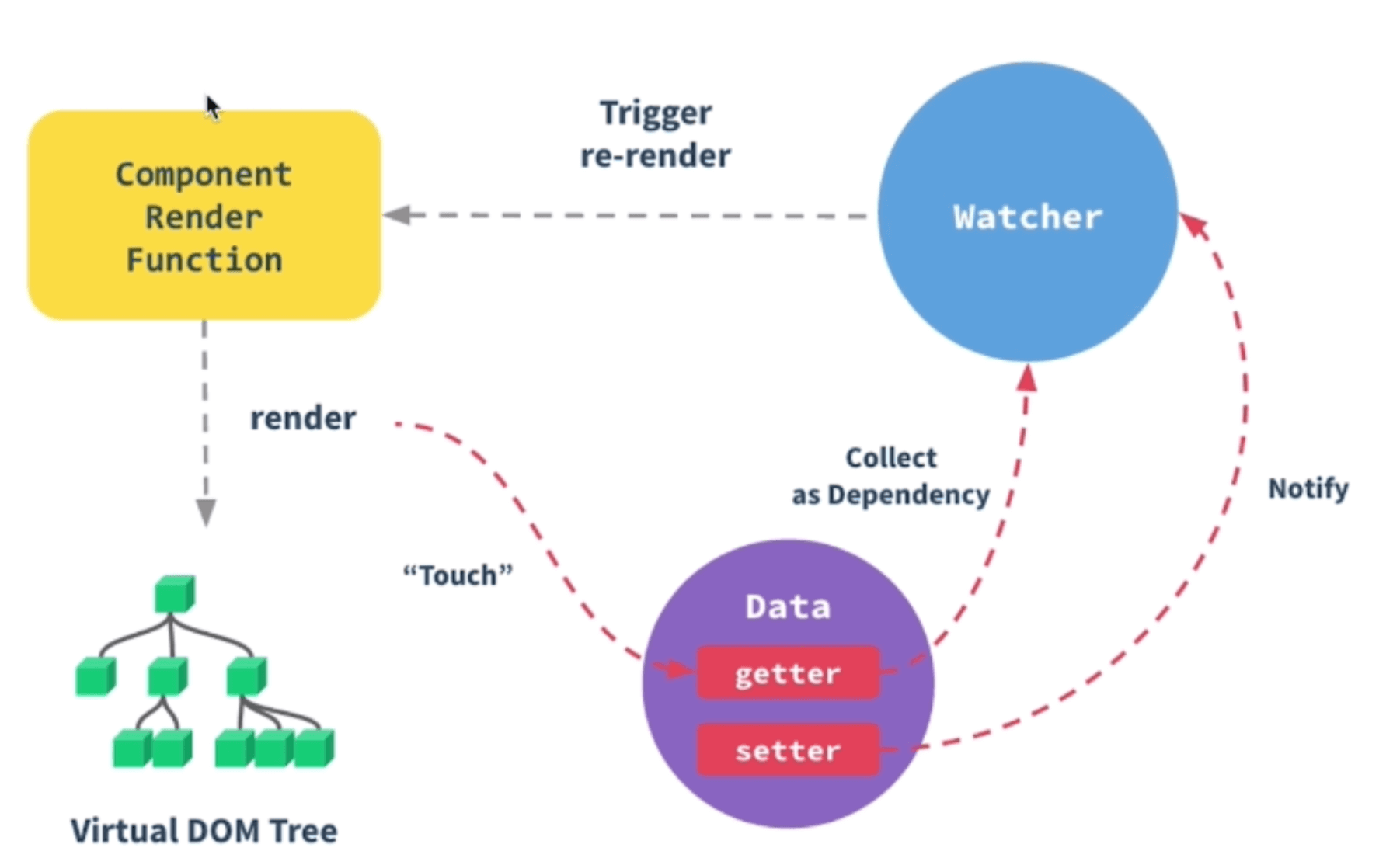
- Asynchronous rendering
- $nextTick will be called back after the DOM is rendered.
- Data modifications will be integrated when the page is rendered, and multiple data modifications will only be rendered once.
- Reduce the number of DOM operations and improve performance.
Note
Requests may start in created. Vue 2 calls it synchronously after instance creation; asynchronous DOM updates do not retry it. Use mounted for work needing mounted DOM. Handle SSR, instance recreation and repeated events separately.Lifecycle documentation.
Pass props to child components
<User v-bind="$Props"/>
Because when using React's higher-order components, it is best to pass all props to the calling parent component.So vue is also mentioned here.
hash mode
- The hash change will trigger the browser to jump, but will not refresh the page.
- Hash changes are never committed to the server
// hash 变化,包括:
// a. JS 修改 url
// b. 手动修改 url 的 hash
// c. 浏览器前进、后退
window.onhashchange = (event) => {
    console.log('old url', event.oldURL)
    console.log('new url', event.newURL)

    console.log('hash:', location.hash)
}

// 页面初次加载,获取 hash
document.addEventListener('DOMContentLoaded', () => {
    console.log('hash:', location.hash)
})

// JS 修改 url
document.getElementById('btn1').addEventListener('click', () => {
    location.href = '#/user'
})
history mode
The page is not refreshed when history jumps, mainly through window.pushState and window.onpopState.
Because the index.html file is returned for all paths.To avoid this, you should cover all routing situations in your Vue application and then present a 404 page.
// 页面初次加载获取hash
document.addEventListener('DOMContentLoaded', () =>{
    console.log('loaded',location.pathname)
})

// 打开一个新的路由
// 【注意】用 pushState 方式,浏览器不会刷新页面
document.getElementById('btn1').addEventListener('click', () => {
    const state = { name: 'page1' }
    console.log('切换路由到', 'page1')
    history.pushState(state, '', 'page1') // 重要!!
})

// 监听浏览器前进、后退
window.onpopstate = (event) => { // 重要!!
    console.log('onpopstate', event.state, location.pathname)
}

// 每次请求服务器都要保证返回index.html页面,然后端端通过onpopstate来控制和监听页面跳到
// 哪里才不会出现页面丢失的现象
// 需要 server 端配合,可参考
// https://router.vuejs.org/zh/guide/essentials/history-mode.html#%E5%90%8E%E7%AB%AF%E9%85%8D%E7%BD%AE%E4%BE%8B%E5%AD%90
To implement vue-router in vue, you need to pass the install method of the component. In the method, you may register the global $route by calling object.defineProperty.Register routerLink and routerView components through Vue.component.
import View from './components/view'
import Link from './components/link'

export let _Vue

export function install (Vue) {
  if (install.installed && _Vue === Vue) return
  install.installed = true

  _Vue = Vue

  const isDef = v => v !== undefined

  const registerInstance = (vm, callVal) => {
    let i = vm.$options._parentVnode
    if (isDef(i) && isDef(i = i.data) && isDef(i = i.registerRouteInstance)) {
      i(vm, callVal)
    }
  }

  Vue.mixin({
    beforeCreate () {
      if (isDef(this.$options.router)) {
        this._routerRoot = this
        this._router = this.$options.router
        this._router.init(this)
        Vue.util.defineReactive(this, '_route', this._router.history.current)
      } else {
        this._routerRoot = (this.$parent && this.$parent._routerRoot) || this
      }
      registerInstance(this, this)
    },
    destroyed () {
      registerInstance(this)
    }
  })

  Object.defineProperty(Vue.prototype, '$router', {
    get () { return this._routerRoot._router }
  })

  Object.defineProperty(Vue.prototype, '$route', {
    get () { return this._routerRoot._route }
  })

  Vue.component('RouterView', View)
  Vue.component('RouterLink', Link)

  const strats = Vue.config.optionMergeStrategies
  // use the same hook merging strategy for route hooks
  strats.beforeRouteEnter = strats.beforeRouteLeave = strats.beforeRouteUpdate = strats.created
}
hash and history
- The hash pattern url will appear
- History mode requires the cooperation of the server
- toB's system recommends using hash. It is simple and easy to use, does not require server cooperation, and is not sensitive to URLs.
- The toC system considers h5 history, but it requires server-side support. History is good for SEO, because search engines generally do not include content (anchor) points after #.